Truck tire quotes, F.E.T. included.
Add tires, labor and extras, and the totals keep up as you type. Share the quote as a PDF on your letterhead before you leave the lot.
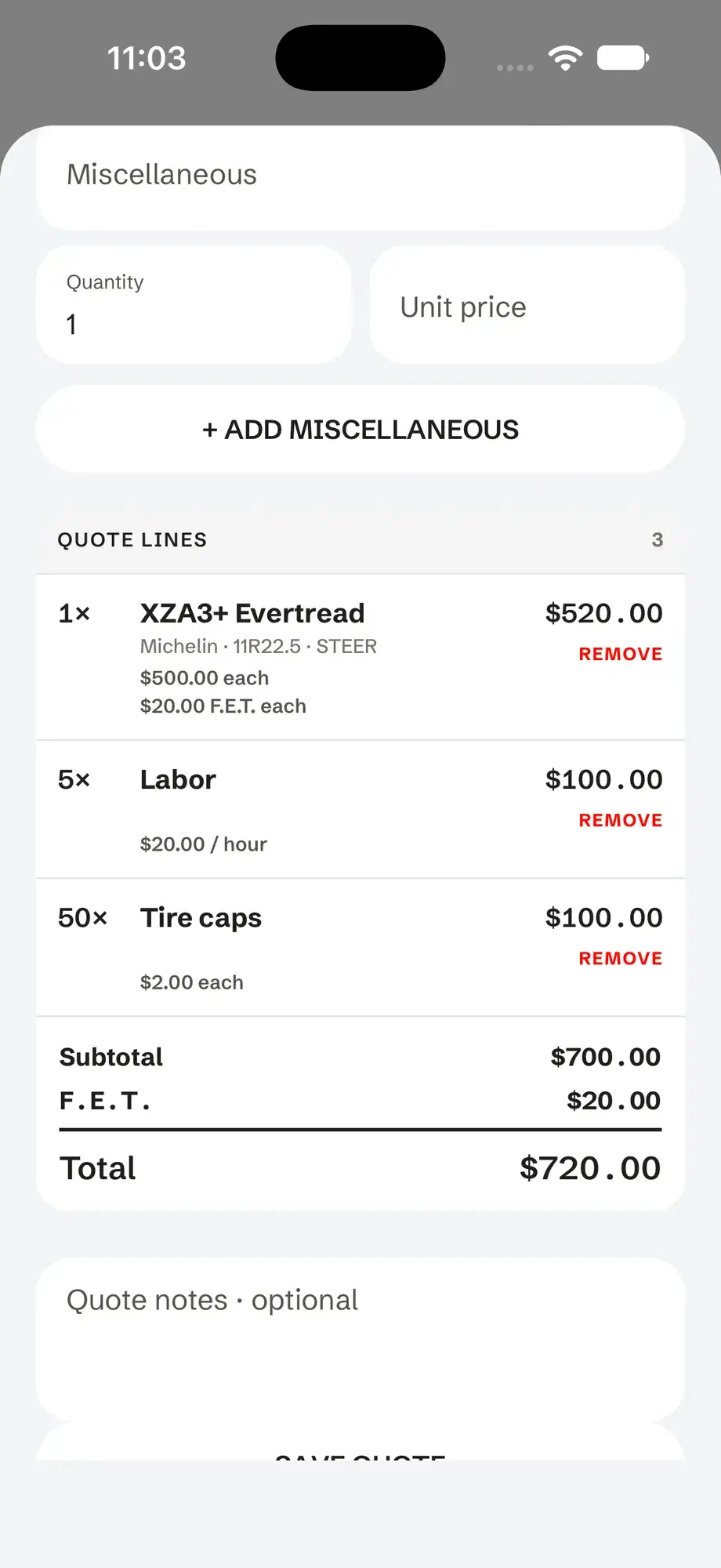
How to build a tire quote in Tread Rep
Pick the account
Choose the customer, give the quote a number and set how long it’s valid.
Add tire lines
Choose the tire type and quantity, then your price and the F.E.T. per tire.
Add labor and extras
Add labor by the hour, and anything else as a miscellaneous line by quantity. Subtotal, F.E.T. and total update as you go.
Share the PDF
Text or email the quote as a PDF. It’s saved to the account, so you can reopen it, change it and send it again.
Tires, labor and extras, added up for you.
A clean quote on your letterhead.
Not a number scribbled on a business card — a quote they can forward to whoever signs off.
- Your company name and logo, with your name and direct line
- Who it’s prepared for, the date issued and valid through
- Each line with its unit price, F.E.T. and amount
- Subtotal, F.E.T. and total, then your notes and terms
Questions
Do truck tires have federal excise tax (F.E.T.)?
Yes, most do: F.E.T. applies to tires rated to carry more than 3,500 pounds, which covers most commercial truck tires. Tread Rep keeps F.E.T. in its own column so the customer sees it apart from your price.
Is there a tire quote template?
Tread Rep lays the quote out for you. Fill in the lines on your phone and it produces the finished PDF, with your letterhead on top.
Can I change a quote after I send it?
Yes. Open it from the customer’s account, edit the lines and share it again.